Monday, 17 June 2013

1 Download Best AutoIndex Scripts

Download Best AutoIndex PHP Scripts :
Download Link : http://d-h.st/IjX
WapIndia AutoIndex
Umpata Scripts
Punk AutoIndex
PHP Album
FreshMaza PC Version AutoIndex


0 How to create your own PHP Grabber ?

How to create your own PHP Grabber ?

Just use this code and create your own PHP Grabber easily.


Sunday, 16 June 2013

0 Download Latest Anime Videos !

Download Latest Anime Videos only on http://gobakabeta.blogspot.com !

Features :
  • All Types of Latest Animes
  • 720p and 1080p Available
  • You can Request Your Anime

0 Dangerous Google - Searching for Secrets :

Dangerous Google - Searching for Secrets :
Download Link : http://www46.zippyshare.com/v/72965526/file.html

What You Will Learn ?
  • How to use Google to find source of personal information and other confidential data.
  • How to find vulnerable system and web services.
  • How to locate publicly available network devices using Google.  

0 New Service of Google - Search by Image

Internet leading search engine company Google launched a new online tool called "Search by Image".
Using this online tool you can search and find Identity of the Image.

How to use this online tool ?
Visit http://www.google.co.in/imghp?hl=en&tab=wi 


Than click on the "Camera" tab.

Click on "Upload an image".
Choose an Image ! Uploading Automatically Started !!!
and a search result look like this !


Have any problem ? Feel free to comment here.

Saturday, 15 June 2013

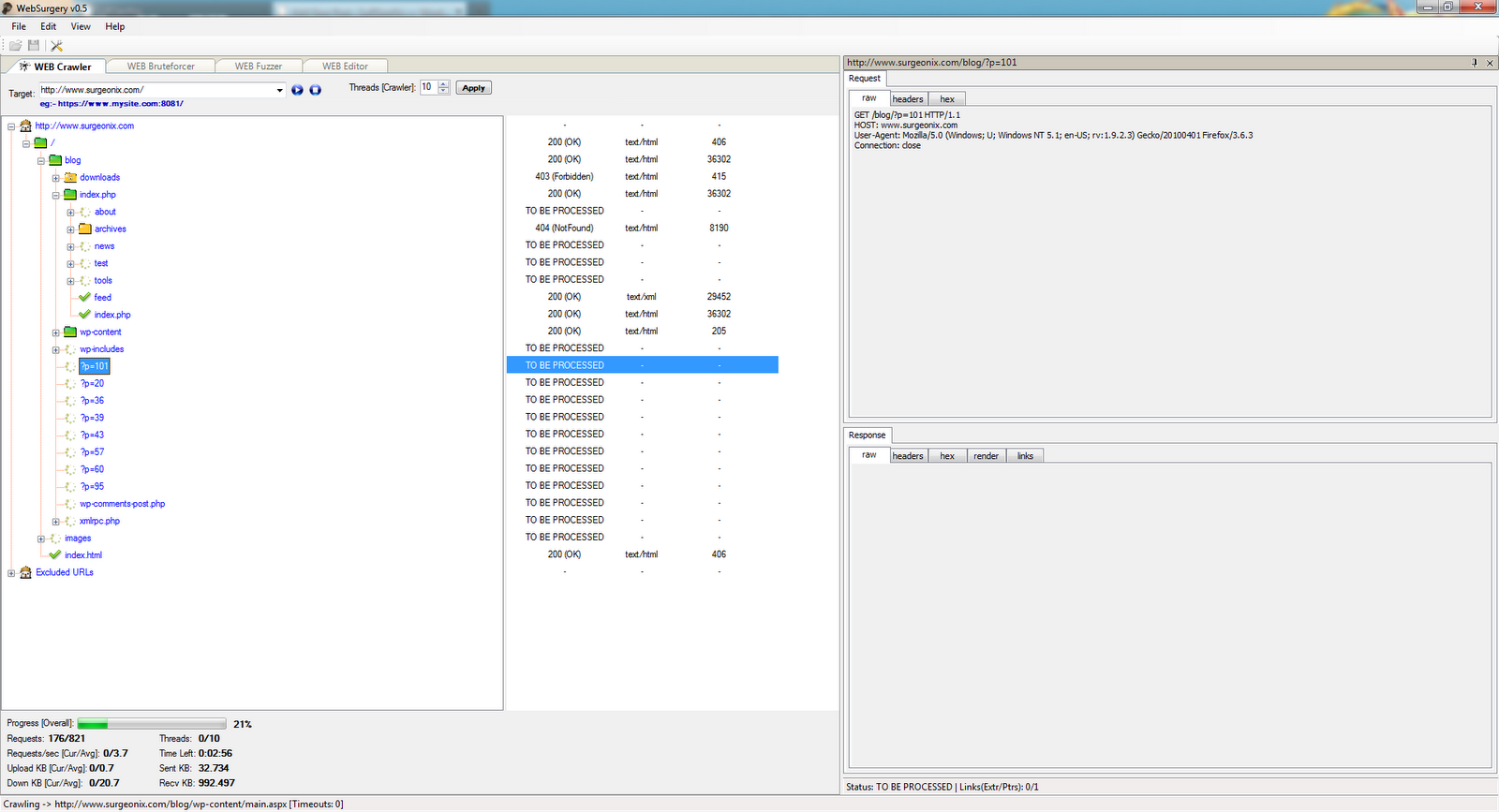
0 WebSurgery - Web Application Security Tool

Web application security is one of the key point to measure the security of a company profile. Website is very important, if the website is personal or if you are responsible for the website of your client, in both cases you must be careful about the security of the website. It is a good practice to be update to secure from exploitation but what about application layer security.

You must do a penetration testing on web application to find the vulnerabilities like, SQL-injectionXSS and others. 

There are so many tools that has been discussed before but there is another good tool called WebSurgery, WebSurgery is a suite of tools for security testing of web applications. It was designed for security auditors to help them with the web application planning and exploitation. Currently, it uses an efficient, fast and stable Web Crawler, File/Dir Bruteforcer and Fuzzer for advanced exploitation of known and unusual vulnerabilities such as SQL InjectionsCross site scripting (XSS), brute-force for login forms, identification of firewall-filtered rules etc.


It has different tools built in to make the test efficient and less time consuming. It is available for windows but by using wine you can run it on Linux. The small description of the tools as below:
  • Web Crawler: WEB Crawler was designed to be fast, accurate, stable, completely parametrable and the use of advanced techniques to extract links from Javascript and HTML Tags.  
  • WEB Bruteforcer: WEB Bruteforcer is a brute forcer for files and directories within the web application which helps to identify the hidden structure.  
  • WEB Fuzzer: WEB Fuzzer is a more advanced tool to create a number of requests based on one initial request. Fuzzer has no limits and can be used to exploit known vulnerabilities such (blind) SQL Inections and more unsual ways such identifing improper input handling and firewall/filtering rules.
Click here to learn more like configuration details.

0 Sqlninja - A SQL Injection Tool

Vulnerability on database is really harmful for the web application, the most common type of attack on database is via SQL-injection. You should secure your web application from these harmful attack because database contain relevant information.There are different tools available to find the vulnerability on web application, as discussed before click here to learn more tools.

Like other tools Sqlninja is used to exploit SQL-injection vulnerability on a web application. Its main goal is to provide a remote access on the vulnerable DB server, even in a very hostile environment. It should be used by penetration testers to help and automate the process of taking over a DB Server when a SQL Injection vulnerability has been discovered.

Sqlninja is written in Perl and should run on any UNIX based platform with a Perl interpreter, as long as all needed modules have been installed. So far it has been successfully tested on:
Requirement 
Since sqlninja is completely written in Perl, there is not much to install, except Perl itself and the following modules, if missing:
  • NetPacket
  • Net-Pcap
  • Net-DNS
  • Net-RawIP
  • IO-Socket-SSL
  • Net-Pcap
You will also need the Metasploit Framework 3 on your box to use the metasploit attack mode, and also a VNC client if you use the VNC payload. 

Features
  • Fingerprint of the remote SQL Server (version, user performing the queries, user privileges, xp_cmdshell availability, DB authentication mode)
  • Bruteforce of 'sa' password (in 2 flavors: dictionary-based and incremental)
  • Privilege escalation to sysadmin group if 'sa' password has been found
  • Creation of a custom xp_cmdshell if the original one has been removed
  • Upload of netcat (or any other executable) using only normal HTTP requests (no FTP/TFTP needed)
  • TCP/UDP portscan from the target SQL Server to the attacking machine, in order to find a port that is allowed by the firewall of the target network and use it for a reverse shell
  • Direct and reverse bindshell, both TCP and UDP

0 Reaver-wps WPA/WPA2 Cracking Tutorial

Reaver performs a brute force attack against an access point's WiFi Protected Setup pin number. Once the WPS pin is found, the WPA PSK can be recovered and alternately the AP's wireless settings can be reconfigured. While Reaver does not support reconfiguring the AP, this can be accomplished with wpa_supplicant once the WPS pin is known.


Reaver performs a brute force attack against the AP, attempting every possible combination in order to guess the AP's 8 digit pin number. Since the pin numbers are all numeric, there are 10^8 (100,000,000) possible values for any given pin number. However, because the last digit of the pin is a checksum value which can be calculated based on the previous 7 digits, that key space is reduced to 10^7 (10,000,000) possible values.
The key space is reduced even further due to the fact that the WPS authentication protocol cuts the pin in half and validates each half individually. That means that there are 10^4 (10,000) possible values for the first half of the pin and 10^3 (1,000) possible values for the second half of the pin, with the last digit of the pin being a checksum.
Reaver brute forces the first half of the pin and then the second half of the pin, meaning that the entire key space for the WPS pin number can be exhausted in 11,000 attempts. The speed at which Reaver can test pin numbers is entirely limited by the speed at which the AP can process WPS requests. Some APs are fast enough that one pin can be tested every second; others are slower and only allow one pin every ten seconds. Statistically, it will only take half of that time in order to guess the correct pin number.

Reaver WPA Cracking Tutorial

Reaver is only supported on the Linux platform, requires the libpcap and libsqlite3 libraries, and can be built and installed by running:


$ ./configure
$ make
# make install
To remove everything installed/created by Reaver:
# make distclean
USAGE
Usually, the only required arguments to Reaver are the interface name and the BSSID of the target AP:


# reaver -i mon0 -b 00:01:02:03:04:05
The channel and SSID (provided that the SSID is not cloaked) of the target AP will be automatically identified by Reaver, unless explicitly specified on the command line:


# reaver -i mon0 -b 00:01:02:03:04:05 -c 11 -e linksys
By default, if the AP switches channels, Reaver will also change its channel accordingly. However, this feature may be disabled by fixing the interface's channel:


# reaver -i mon0 -b 00:01:02:03:04:05 --fixed
The default receive timeout period is 5 seconds. This timeout period can be set manually if necessary (minimum timeout period is 1 second):


# reaver -i mon0 -b 00:01:02:03:04:05 -t 2
The default delay period between pin attempts is 1 second. This value can be increased or decreased to any non-negative integer value. A value of zero means no delay:


# reaver -i mon0 -b 00:01:02:03:04:05 -d 0
Some APs will temporarily lock their WPS state, typically for five minutes or less, when "suspicious" activity is detected. By default when a locked state is detected, Reaver will check the state every 315 seconds (5 minutes and 15 seconds) and not continue brute forcing pins until the WPS state is unlocked. This check can be increased or decreased to any non-negative integer value:


# reaver -i mon0 -b 00:01:02:03:04:05 --lock-delay=250
For additional output, the verbose option may be provided. Providing the verbose option twice will increase verbosity and display each pin number as it is attempted:


# reaver -i mon0 -b 00:01:02:03:04:05 -vv
The default timeout period for receiving the M5 and M7 WPS response messages is .1 seconds. This timeout period can be set manually if necessary (max timeout period is 1 second):


# reaver -i mon0 -b 00:01:02:03:04:05 -T .5
Some poor WPS implementations will drop a connection on the floor when an invalid pin is supplied instead of responding with a NACK message as the specs dictate. To account for this, if an M5/M7 timeout is reached, it is treated the same as a NACK by default. However, if it is known that the target AP sends NACKS (most do), this feature can be disabled to ensure better reliability. This option is largely useless as Reaver will auto-detect if an AP properly responds with NACKs or not:


# reaver -i mon0 -b 00:01:02:03:04:05 --nack
While most APs don't care, sending an EAP FAIL message to close out a WPS session is sometimes necessary. By default this feature is disabled, but can be enabled for those APs that need it:


# reaver -i mon0 -b 00:01:02:03:04:05 --eap-terminate

When 10 consecutive unexpected WPS errors are encountered, a warning message will be displayed. Since this may be a sign that the AP is rate limiting pin attempts or simply being overloaded, a sleep can be put in place that will occur whenever these warning messages appear:


0 How To Install Backtrack 5 Dual Boot-Tutorial

Now I am going to show you how to do this, first of all make back up of your windows installer, if you are using USB to boot backtrack than first learn how to make USB click here


After successfully boot 

  • Start backtrack installer
  • Select your language
  • Select your geographical location
  • Choose your keyboard layout, or leave it on a default means USA
  • Now the next window is to make partition select "Install them side by side, choosing between them each startup" than click forward.


  • On the next window confirm the setting for your hard disk.
  • Than check all the install component and click on install.
  • As discussed on previous article that when the installation reaches at 99% it takes some time so do not worry about it.
  • Press the restart button.
  • On the next boot your computer will ask you to choose a operating system
  • Do not forget the default username root and password toor, and do not forget to change them.
  • Now you are able to run backtrack5 with windows XP, windows 7 and Windows Vista.


© Copyrights - Droid Guru